With the update from 2.01 to 2.02, equations built with $$$$ are not working reliably. I can get it to work, but if a syntax error comes up, it won’t resolve, even if the syntax is fixed.
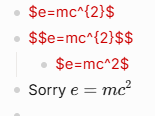
I think this is a bug where typing $$ automatically applies #math and creates a math block, but $$$$ doesn’t disappear as expected.
If you want to use the $$math$$ syntax instead of a math block, a temporary workaround until the bug is fixed might be to type an extra character before entering $$.
1 Like
Oh, cool, I wasn’t aware of the Math tag. I actually seem to get better results applying the math tag directly with #.
This begs the question: the “math” tag doesn’t appear on the right, as most other tags. So, how do I remove the math tag, or verify that the math tag has been applied?
Mathblocks are usually rendered as mathematical expressions by default, or displayed in red if there’s a rendering error, so it should be relatively easy to tell whether a block is a mathblock or not. That said, rendering errors could be indicated more clearly.
Removing a tag is a bit unintuitive. When the cursor is blinking, press Esc to select the block itself, then use the pt shortcut to open the tag selection popup. Select Math to remove the tag.
You can remove code block and quote block tags in the same way.
I just found out that tags like Math have the Hide from Node property enabled by default, which is why they don’t appear next to the node. If you disable this property on the Math tag page, the #Math tag should appear next to the node as usual.
1 Like