Adding a fake SOMEDAY task marker

I have some tasks which I would like to do, but aren’t relevant right now. This snippet (for config.edn) adds a /SOMEDAY slash command. It adds or replaces the block’s task marker with SOMEDAY. I wrap it in internal-link brackets so that it has similar behavior to the built-in task markers. At some point I’ll add some custom css to make it have same look and feel as other tasks.

 :commands [
   ["SOMEDAY" [[:editor/clear-current-slash] [:editor/set-marker "[[SOMEDAY]]"] [:editor/move-cursor-to-end]]]
 ]

References:

Handy! Thanks for sharing!

Here’s a CSS snippet that brings the style closer to a TODO item.

/* SOMEDAY Marker */ 
span[data-ref="SOMEDAY"] {
    border: 0;
    font-size: 85%;
    font-weight: 650;
    margin: 0 2px 0 0;
    opacity: .7;
    padding: 2px 4px;
}

Is there a trick to getting this working? I added it to the :commands block and refreshed my graph, but nothing happens when I try to type /someday. I tried changing my default workflow from :todo to :now, but that didn’t help.

I really like the idea of being able to do this, because I have “SOMEDAY” ideas all the time and like to circle back to them every so often to see if I still think I might do them someday or not, but I can’t seem to get this working.
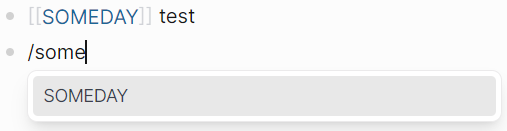
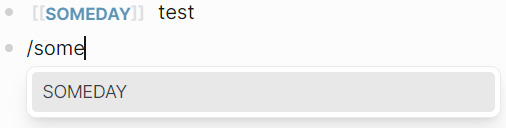
  • Most changes to file config.edn apply right after saving the file, but this one requires restarting Logseq.
  • Mistakes are not forgiven.
    • Ensure that this entry:
       ;; Add your own commands to slash menu to speedup.
       ;; E.g.
       ;; :commands
       ;; [
       ;; ["js" "Javascript"]
       ;; ["md" "Markdown"]
       ;; ]
       :commands
       []
      
    • is replaced by an entry like this one:
       ;; Add your own commands to slash menu to speedup.
       ;; E.g.
       ;; :commands
       ;; [
       ;; ["js" "Javascript"]
       ;; ["md" "Markdown"]
       ;; ]
       :commands [
         ["SOMEDAY" [
             [:editor/clear-current-slash]
             [:editor/set-marker "[[SOMEDAY]]"]
             [:editor/move-cursor-to-end]
         ] ]
       ]
      
      • I have formatted the square brackets for easier reading.
    • The result looks like this:

Ah! This is the first config.edn edit I’ve made that required an actual restart, not just CTRL+R! Lo and behold, now it’s working. Thanks!