Custom CSS highlighting parts of blocks

I’m trying to play a TTRPG (Legend in the Mist, highly recommend it) in Logseq.

Highlighting words and phrases is very useful in this game. I’m trying to add an emoji at the start of a block and then highlight the rest of the block in different colors (yellow, red, green, etc).

In the example bellow I set the whole block to be highlighted in yellow, but that also highlights the emoji and it makes the whole thing hard to read. Is it possible to detect if there’s a specific emoji at the beginning of the block and then highlight just the test part?
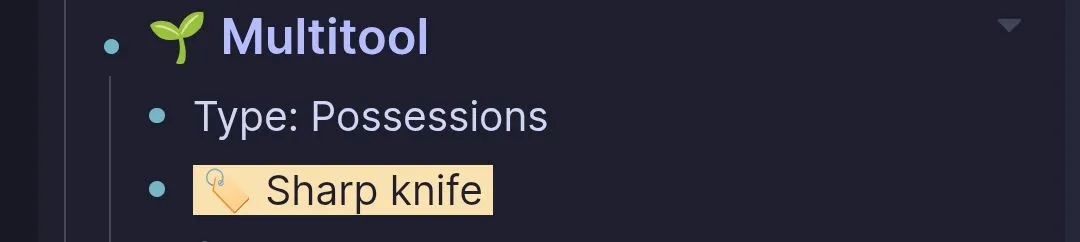
Here’s more or less what it looks like for half of the character sheet:

  • I don’t think that CSS can detect specific emojis.
    • That would need Javascript.
  • Here is a workaround with macros:
    • Inside macros{} of file config.edn add a very simple macro like this one:
      :emoji "$1"
      
      • Could pick a shorter name, e.g. :e
        • This exact name (without the colon) should be used in all places lower.
    • Use it in a block like this:
      {{emoji 🔥}}
      
      • The left part is the name you chose for your macro.
      • The right part is the actual emoji.
    • In file custom.css add rules like these ones:
      .macro {
        display: inline;
      }
      
      div[data-macro-name="emoji"] {
        background: black;
      }
      
      span:has(div[data-macro-name="emoji"]) {
        padding-left: 0;
      }
      
      • The value of the data-macro-name should be the one chosen earlier.
      • The background should match the one of your theme.
  • There are various scenarios that won’t work without further customization.
    • Initially experiment with very simple blocks, to ensure that you followed the directions correctly.
    • If you need more specific help, should:
      • open the inspector (Ctrl + Shift + i)
      • use the tool to inspect a problematic emoji
      • take a screenshot and share it here
      • inform us if you use any particular theme or plugin that affects emojis or highlights