Hi,
i thought it’s trivial, but i can’t get it to work… I’ve got notes like below:
- some block #test
	- block A
		- AAA
		- aaa
	- block B #archive
		- bbb
		- bbb
	- bloc C
		- CCCC
		- cccc #archive
- some second block
	- block D
		- ddd #test
		- DDD
now, i want to build a query, which’ll show me all block with #test tag, without blocks with #archive.
I thought, that simple:
{{query (and [[test]] (not [[archive]]))}}
should do the job, but that shows me only
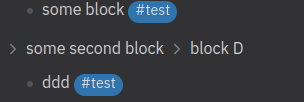
Could someone help me with that?
1 Like
What should it show instead?
I’d like to see everything, what isn’t marked as archive, so in above example:
- some block #test
	- block A
		- AAA
		- aaa
	- bloc C
		- CCCC
- some second block
	- block D
		- ddd #test
This is not possible with a simple query, but it is with an advanced one.
- Based on your example, that query should return all non-archived blocks that either:
- contain tag
#test
- e.g. blocks
some block and ddd
- have an ancestor block that contains tag
#test
- have a descendant block that contains tag
#test
- e.g. blocks
some second block and block D
- However, could you clarify the following things in your example:
- What exactly qualifies block
DDD to be part of the results?
- The above cases don’t capture it. What other case should be included to capture it?
- What should happen with the descendants of
#archive (i.e. blocks bbb) if they happen to contain tag #test themselves?
Sorry, my mistake - block DDD shouldn’t be visible (i’ve already edited previous post)
about “some second block” - it doesn’t have to be visible as long as i can see “ddd” (it’s even better when it’s hided), so we can make it a bit simpler removing your third condition
tag #archive is the most important, so it should always hide block, which contains it (and all subblocks of that block), regardless occurrence of #test tag
Try this:
#+BEGIN_QUERY
{:query [:find (pull ?b [*])
   :in $ %
   :where
     [?yes :block/name "test"]
     (or-join [?b ?yes]
       [?b :block/refs ?yes]
       (and
         (ancestor ?a ?b)
         [?a :block/refs ?yes]
       )
     )
     (not
       [?no :block/name "archive"]
       (or-join [?b ?no]
         [?b :block/refs ?no]
         (and
           (ancestor ?a ?b)
           [?a :block/refs ?no]
         )
         (and
           (descendant ?d ?b)
           [?d :block/refs ?no]
         )
       )
     )
 ]
 :inputs [
   [
     [
       [ancestor ?a ?b]
       [?b :block/parent ?a]
     ]
     [
       [ancestor ?a ?b]
       [?parent :block/parent ?a]
       (ancestor ?parent ?b)
     ]
     [
       [descendant ?d ?b]
       [?d :block/parent ?b]
     ]
     [
       [descendant ?d ?b]
       [?d :block/parent ?child]
       (descendant ?child ?b)
     ]
   ]
 ]
}
#+END_QUERY
2 Likes
Works as expected, thank you for your help
Hey! I thought that would show « some block # test » but hide the child block « block B #archive » since it’s excluded, kind of like the Linked References Filter Pane ! Your solution simply excludes « some block #test » from the query results although it would be relevant as it’s not tagged with #archive. How can I adjust the query to get that result ? = excluding certain child blocks when expanding the block parent as part of the query results in the style of the built-in Filter Pane. Thanks
Thank you for your response. I actually want exactly what @marcink had in mind, which is a filtered hierarchy (WorkFlowy-style), giving us this result :
- some block #test
- some second block
Your proposed query only goes for the deepest nodes and shows the parents as breadcrumbs. It’s not quite it. Thank you!
Try this:
#+BEGIN_QUERY
{:query [:find (pull ?b [*])
   :in $ %
   :where
     [?yes :block/name "test9"]
     (or-join [?b ?yes]
       [?b :block/refs ?yes]
       (and
         (ancestor ?a ?b)
         [?a :block/refs ?yes]
       )
       (and
         (descendant ?d ?b)
         [?d :block/refs ?yes]
       )
     )
     (not
       [?no :block/name "archive"]
       (or-join [?b ?no]
         [?b :block/refs ?no]
         (and
           (ancestor ?a ?b)
           [?a :block/refs ?no]
         )
         (and
           (descendant ?d ?b)
           [?d :block/refs ?no]
         )
       )
     )
  ]
 :inputs [
   [
     [
       [ancestor ?a ?b]
       [?b :block/parent ?a]
     ]
     [
       [ancestor ?a ?b]
       [?parent :block/parent ?a]
       (ancestor ?parent ?b)
     ]
     [
       [descendant ?d ?b]
       [?d :block/parent ?b]
     ]
     [
       [descendant ?d ?b]
       [?d :block/parent ?child]
       (descendant ?child ?b)
     ]
   ]
 ]
}
#+END_QUERY
You may experiment with removing some conditions from :where .