Anyone knows how to change default number list style?
And how to add more level style instead of cycling “1-a-I“
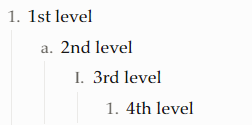
1 Like
I second this request for custom formatting/alternate options for numbered list style!
I am new here and have no clue about CSS or JS, so hopeless about building this myself. But I find the default numbered list style ugly and it does not match my usual thinking or workflow.
Ideally I would like a style like (please ignore the italics that appears, not sure why that happened!):
1.
  1.1
  1.2
    1.2.1
2.
  2.1
    2.1.1
      2.1.1.1
etc...
(Assuming that I typed that correctly!) Basically the style where each indent adds a dot and a new number sequence starts there.
I have been searching all over the internet and this forum for clues on how to do this but so far no luck. (And Google’s AI answers all fail badly!)
Any advice appreciated!
Yes!Your style is just like what I want 
Hope somebody could help us
“Logtools - productivity pack” plugin
1 Like