Two pain points of Logseq’s native Zotero integration
- Cloud import is too slow.
- The PDF imported from Zotero into Logseq duplicates Zotero’s own PDF reading and annotation features, and Logseq’s PDF reader is not as good as Zotero’s.
Requirements
- References can be imported quickly in Logseq, and pages corresponding to the literature can be created.
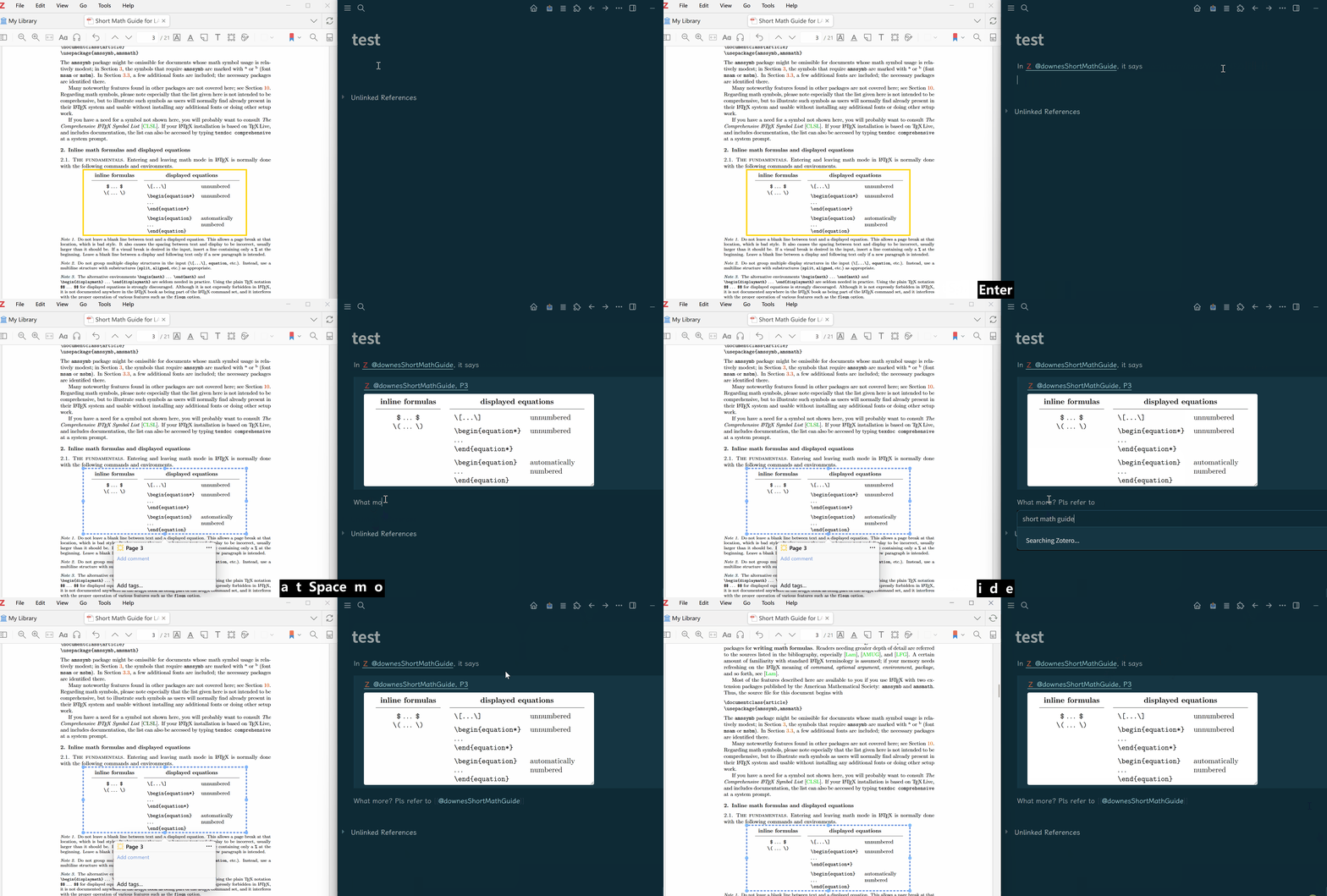
- The Zotero PDF reader and Logseq can be opened at the same time. Using copy-and-paste shortcuts, Zotero items and annotation hyperlinks can be copied into Logseq. Entire annotations with backlinks can also be copied, and images can be handled properly.
Solution
On the Zotero side
- Install the plugin GitHub - windingwind/zotero-actions-tags: Customize your Zotero workflow. · GitHub
- Create Script 1: Copy citation
// Zotero Actions & Tags script
// Copy the selected PDF annotation as a Markdown quote block with a deep link.

const COPY_DATA_URL = true; // true: data:image/png;base64,... false: raw base64 only
// Valid range: 1-4.
// 1 = keep Zotero's original rendered resolution
// 2 = halve image width/height
// 3 = one-third image width/height
// 4 = one-quarter image width/height
const IMAGE_RESOLUTION_DIVISOR = 2;
const TITLE = "Copy Annotation Quote";
const IMAGE_TYPES = new Set(["image", "ink"]);
const TEXT_TYPES = new Set(["highlight", "underline", "text", "note"]);

function fail(message) {
	Zotero.alert(null, TITLE, message);
	throw new Error(message);
}

function getActiveReader() {
	const mainWindow = Zotero.getMainWindow?.();
	const selectedTabID = mainWindow?.Zotero_Tabs?.selectedID;
	if (selectedTabID) {
		const tabReader = Zotero.Reader.getByTabID(selectedTabID);
		if (tabReader) {
			return tabReader;
		}
	}

	if (typeof window !== "undefined" && window.reader) {
		return window.reader;
	}

	return Zotero.Reader._readers.find(reader => reader?._internalReader && reader.type === "pdf");
}

function getParentItemForCitation(attachmentItem) {
	let item = attachmentItem;
	while (item?.parentItemID) {
		item = Zotero.Items.get(item.parentItemID);
	}
	return item || attachmentItem;
}

function getCitationKey(item) {
	const citationKey = item?.getField?.("citationKey");
	if (citationKey) {
		return citationKey;
	}
	return item?.key || "UNKNOWN";
}

function getPageLabel(annotation) {
	if (annotation.pageLabel && annotation.pageLabel !== "-") {
		return annotation.pageLabel;
	}
	const pageIndex = annotation.position?.pageIndex;
	if (Number.isInteger(pageIndex)) {
		return String(pageIndex + 1);
	}
	return "";
}

function buildAnnotationLink(attachmentItem, annotation) {
	const library = Zotero.Libraries.get(attachmentItem.libraryID);
	let path;
	if (library.libraryType === "group") {
		path = `groups/${library.groupID}/items/${attachmentItem.key}`;
	}
	else {
		path = `library/items/${attachmentItem.key}`;
	}

	const params = new URLSearchParams();
	const pageLabel = getPageLabel(annotation);
	if (pageLabel) {
		params.set("page", pageLabel);
	}
	params.set("annotation", annotation.id);
	return `zotero://open-pdf/${path}?${params.toString()}`;
}

function buildHeader(citationKey, annotationLink, pageLabel) {
	const citeSuffix = pageLabel ? `, P${pageLabel}` : "";
	return `> [@${citationKey}${citeSuffix}](${annotationLink})`;
}

function getTextContent(annotation) {
	const text = annotation.text?.trim();
	const comment = annotation.comment?.trim();
	if (text) {
		return text;
	}
	if (comment) {
		return comment;
	}
	return "";
}

function buildReturnMessage(output) {
	const maxLength = 30;
	if (output.length <= maxLength) {
		return output;
	}
	return `${output.slice(0, maxLength)}... (${output.length} chars)`;
}

function getImageResolutionDivisor() {
	const value = Math.round(IMAGE_RESOLUTION_DIVISOR);
	if (value < 1 || value > 4) {
		fail("IMAGE_RESOLUTION_DIVISOR must be an integer between 1 and 4.");
	}
	return value;
}

async function resizeImageDataURL(reader, dataURL, divisor) {
	if (divisor === 1) {
		return dataURL;
	}

	const img = new reader._iframeWindow.Image();
	img.src = dataURL;
	if (typeof img.decode === "function") {
		await img.decode();
	}
	else {
		await new Promise((resolve, reject) => {
			img.onload = resolve;
			img.onerror = reject;
		});
	}

	const width = Math.max(1, Math.round(img.naturalWidth / divisor));
	const height = Math.max(1, Math.round(img.naturalHeight / divisor));
	const canvas = reader._iframeWindow.document.createElement("canvas");
	canvas.width = width;
	canvas.height = height;

	const context = canvas.getContext("2d");
	context.drawImage(img, 0, 0, width, height);
	return canvas.toDataURL("image/png", 1);
}

async function waitForAnnotationImage(reader, annotationID) {
	for (let i = 0; i < 20; i++) {
		const annotation = reader._internalReader?._state?.annotations?.find(x => x.id === annotationID);
		if (annotation?.image) {
			return annotation.image;
		}
		await Zotero.Promise.delay(100);
	}

	const item = Zotero.Items.getByLibraryAndKey(reader._item.libraryID, annotationID);
	if (item?.isAnnotation?.() && IMAGE_TYPES.has(item.annotationType)) {
		const json = await Zotero.Annotations.toJSON(item);
		if (json.image) {
			return json.image;
		}
	}
	return null;
}

const reader = getActiveReader();
if (!reader) {
	fail("No active PDF reader was found.");
}

await reader._waitForReader?.();

const internalReader = reader._internalReader;
const selectedIDs = internalReader?._state?.selectedAnnotationIDs || [];
if (selectedIDs.length !== 1) {
	fail("Select exactly one annotation in the PDF reader.");
}

const annotationID = selectedIDs[0];
const annotation = internalReader._state.annotations.find(x => x.id === annotationID);
if (!annotation) {
	fail("The selected annotation could not be found.");
}

const attachmentItem = reader._item;
const citationItem = getParentItemForCitation(attachmentItem);
const citationKey = getCitationKey(citationItem);
const pageLabel = getPageLabel(annotation);
const annotationLink = buildAnnotationLink(attachmentItem, annotation);

let body = "";
if (IMAGE_TYPES.has(annotation.type)) {
	const dataURL = await waitForAnnotationImage(reader, annotationID);
	if (!dataURL) {
		fail("The selected image annotation has not been rendered yet. Try again after it appears in the annotations sidebar.");
	}
	const resizedDataURL = await resizeImageDataURL(reader, dataURL, getImageResolutionDivisor());
	body = COPY_DATA_URL ? resizedDataURL : resizedDataURL.replace(/^data:image\/png;base64,/, "");
}
else if (TEXT_TYPES.has(annotation.type)) {
	body = getTextContent(annotation);
	if (!body) {
		fail("The selected text annotation does not contain quote text or note content.");
	}
}
else {
	fail(`Unsupported annotation type: ${annotation.type}`);
}

const output = `${buildHeader(citationKey, annotationLink, pageLabel)}\n> ${body}`;
Zotero.Utilities.Internal.copyTextToClipboard(output);
return buildReturnMessage(output);
- copy annotation
// Zotero 9 Copy Link - 稳定定稿版
if (!item) return "未选中条目";

let uri, targetItem;
let citeKey = "";
let pageNumber = "N/A";

try {
    // 1. 环境检测
    let window = Zotero.getMainWindow();
    let reader = window.Zotero_Tabs ? Zotero.Reader.getByTabID(window.Zotero_Tabs.selectedID) : null;

    // 2. 核心判定逻辑
    // 【分支 A】选中了标注:生成精准跳转链接
    if (item.itemTypeID === 31 || item.isAnnotation?.()) {
        let pID = item.parentID || item.getField('parentID');
        let pdfItem = Zotero.Items.get(pID);
        pageNumber = item.annotationPageLabel || item.getField('pageLabel') || "N/A";

        uri = `zotero://open-pdf/library/items/${pdfItem.key}?page=${pageNumber}&annotation=${item.key}`;
        targetItem = Zotero.Items.get(pdfItem.parentID) || pdfItem;
    }
    // 【分支 B】在阅读器内(未选标注):生成打开文件链接
    else if (reader) {
        uri = `zotero://open-pdf/library/items/${item.key}`;
        targetItem = (item.isAttachment && item.isAttachment()) ? (Zotero.Items.get(item.parentID) || item) : item;
    }
    // 【分支 C】在 Library 列表:生成定位链接
    else {
        uri = `zotero://select/library/items/${item.key}`;
        targetItem = (item.isAttachment && item.isAttachment()) ? (Zotero.Items.get(item.parentID) || item) : item;
    }

    // 3. 提取 Citation Key
    if (targetItem) {
        citeKey = targetItem.getField('citationKey') || targetItem.getField('shortTitle') || targetItem.key || "NoKey";
    }

    // 4. 构建输出格式
    let output = (pageNumber === "N/A")
        ? `[@${citeKey}](${uri})`
        : `[@${citeKey}, P${pageNumber}](${uri})`;

    // 5. 执行复制
    const clipboard = new Zotero.ActionsTags.api.utils.ClipboardHelper();
    clipboard.addText(output, "text/unicode");
    clipboard.copy();

    return `已复制: ${output}`;

} catch (err) {
    // 最后的保底
    const clipboard = new Zotero.ActionsTags.api.utils.ClipboardHelper();
    clipboard.addText(`[@${item.key}](zotero://select/library/items/${item.key})`, "text/unicode");
    clipboard.copy();
    return "保底复制(环境异常)";
}
On the Logseq side
- Install the plugin GitHub - zzhixin/logseq-long-form-plugin · GitHub to take over the base64 image paste behavior.
- Install the plugin GitHub - zzhixin/logseq-zotero-citation · GitHub for faster local literature reference search.
Effect