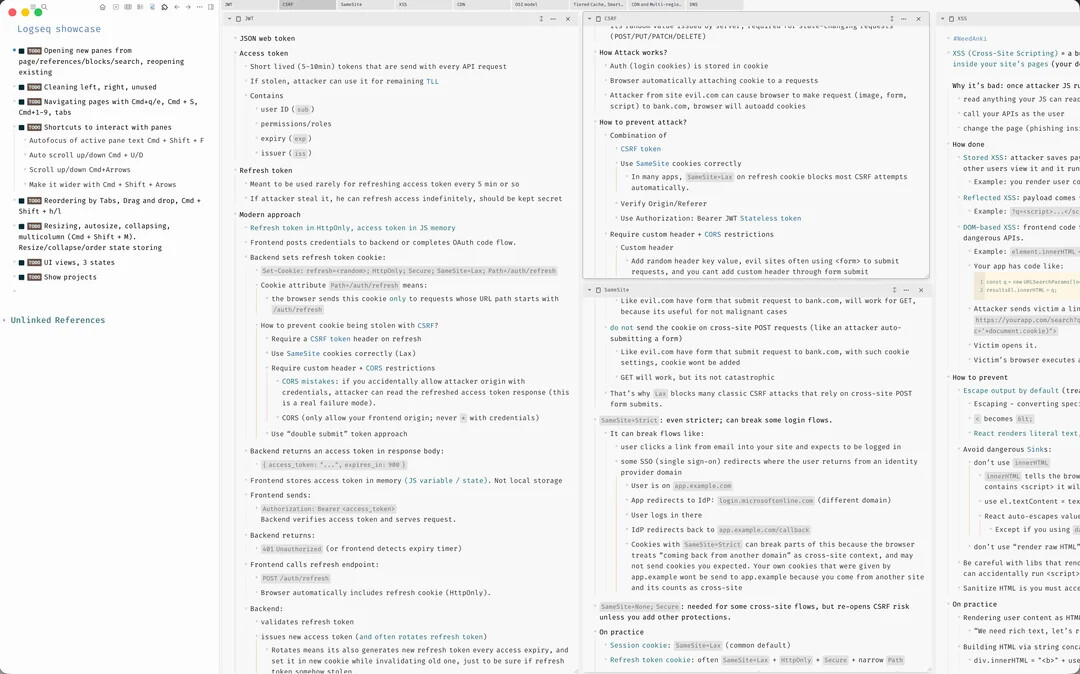
Plugin changes right side infinite scroll into panes. Allows keyboard first navigation, seeing more pages at the same time, and perfect for wide monitors.
Why
To understand a complex problem, idea, or concept you need to understand its small pieces. To understand how to build a rocket, you need to understand every part of it. We take a system or concept and pull it downwards to the point of irreducibility — bullet points, Zettelkasten, atomic notes are perfect for that.
Panes mode allows you to manipulate these small pieces in wiki-style easily and see the big picture / find connections between panes to understand complex ideas.
In the LLM world we are dealing with more and more information every day, more and more abstractions. We need tools to see and operate more information at the same time and keeping track on details.
Logseq current UI is great at outlining but not perfect for further work with data. What’s the point of outlining if you can’t work with your outlined data?
Looks interesting, thank you! Will definitely have a go once db is officially out (I’m waiting for that before I switch).
It works differently to how I’m used to in Remnote though, where each tab on top represents a particular set of panels (each panel shows a certain node). For example:
I have a “Home” tab, with a big panel on the left with my main home node, then a smaller pane on the right with home -related to-dos.
I have a “Tasks” tab with a certain configuration of panels showing various types/views of my tasks
I have a “Project X” tab, with panels useful for that particular project
etc.
Your implementation doesn’t seem to have such hierarchy (tabs>panels), unless I’m mistaken.
I can see the appeal for horizontal scrolling, however to me it’s important that I can see all panels within a tab at the same time - that’s the whole point, as it acts as a dashboard (of course, I’d still want to be able to scroll freely within each panel).
where each tab on top represents a particular set of panels (each panel shows a certain node)
Yes we dont have such thing, but we have Projects, its basically saved list of panes, with order, size and so on, i’m showing it at the end of video. Not as convenient as tab → List of panes tho.
About all panes at the same time, i think its about monitor size, i have ultra-wide and i can see Left side page + 6-8 panes on the right at the same time. For video i used my macbook screen so more people could relate to experience and see text on smaller monitors on video.
For one project, like System Design or Algorithms learning, i have 30+ panes open at the same time, and scroll through them, at moment i see 6-8, but i can scroll more right to see others. When you have complex topic, you tend to have 10+ panes, i have one project with 70 panes (Not full height ones obv).