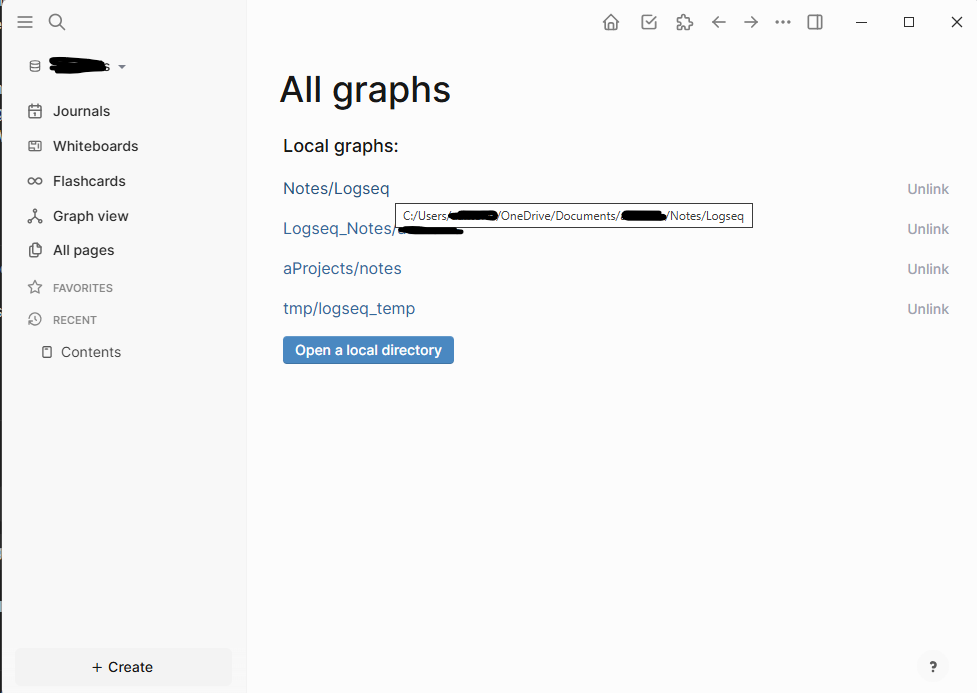
I have been using Logseq for about 6 months. My graph is located at: C:\Users\OneDrive\Documents\Notes\Logseq
It contained many journal entries and pages. The computer has been updated and rebooted multiple times, and OneDrive has been syncing continuously.
Yesterday I went to Logseq > Settings > Advanced and clicked “Clear” under “Clear cache.” The warning message states that open graphs would be discarded and unsaved changes would be lost. I did not expect this to affect saved files.
After clearing the cache, my entire graph became empty. All notes are gone.
Since the graph is stored inside OneDrive, I attempted to restore my OneDrive to the previous day. That did not help. I also tried restoring from a week earlier, same result. The Logseq folder remains empty.
One detail: in one older backup I found the very first test page I ever created, but nothing else. This makes me unsure whether OneDrive ever properly synced the .md files. However, it must have synced at least once.
I left OneDrive untouched for about 12 hours to ensure full syncing, but no files reappeared.
I also searched my system and found these folders:
C:\Users.logseq
C:\Users\AppData\Roaming\Logseq
C:\Users\AppData\Local\Logseq
None of them contain my notes.
Has anyone experienced something similar after clearing the cache? Is there any other location where Logseq might have stored the markdown files? Any recovery suggestions would be appreciated.
1 Like
The signs point to your data being stored in a different location than your remembered. Because cache clearing doesn’t delete notes in my experience, and OneDrive should be able to show you which files were deleted and let you restore them.
My only suggestion is to think back to when you created the graph. Did your use cloud file storage way that time? Which device were you using? Imagine setting up a new graph at that time. When prompted, where do you save it?
Excuse me for banality of my question but have you check the path in “All graphs” page?
Thank you guys. Yes I did check the path and confirmed with what I can see on the screen the path of my graphs. I honestly cannot explain this. I feel that OneDrive failed me somehow but I have never experienced something similar in the past. I was only hopping that I can find some proof in the some hidden LogSeq db of my pages because I am losing my mind.
What about other devices connected to OneDrive and other files than Logseq files on those devices? Is everything all right?
Everything seems okay with OneDrive on my other devices and with other files, as far as I can tell. Of course, I do not know what I do not know, so unless I start having issues elsewhere I will not be able to tell if something is missing. My latest documents seem fine. It is just annoying that I cannot figure out what happened. Either I did something wrong, or LogSeq failed me, and on top of that I cannot explain the OneDrive behavior.
Previously have you unistalled the Logseq app?
Has Logseq app access to C:\ partition? Have you checked permissions in OS?
Have you checked if in the backups there is a copy of the Logseq cache?
Thanks Harlock. I never uninstalled the Logseq app before. Yes Logseq has access to C:\. There is only one drive on the laptop. My user has permissions to the data location. There is no Logseq user. I checked the backup folder. Assuming you are talking about the Logseq\logseq\bak\pages\ folder, there are some files in there but these ones are “newer”, created after I lost everything.
Cannot explain how I lost these files and how there is no trace of them.
take a look at C:\Users\user.logseq\graphs
There are some files under the graphs folder that look like a raw backup of a Logseq workspace, but they do not contain the actual content I lost.
I did some more research and found posts from other people who experienced similar data loss.
At this point I am tired of dealing with this. Based on what I have read, it makes me uncomfortable continuing to rely on Logseq. I will likely switch to another app. Given my needs, I am leaning toward Obsidian.