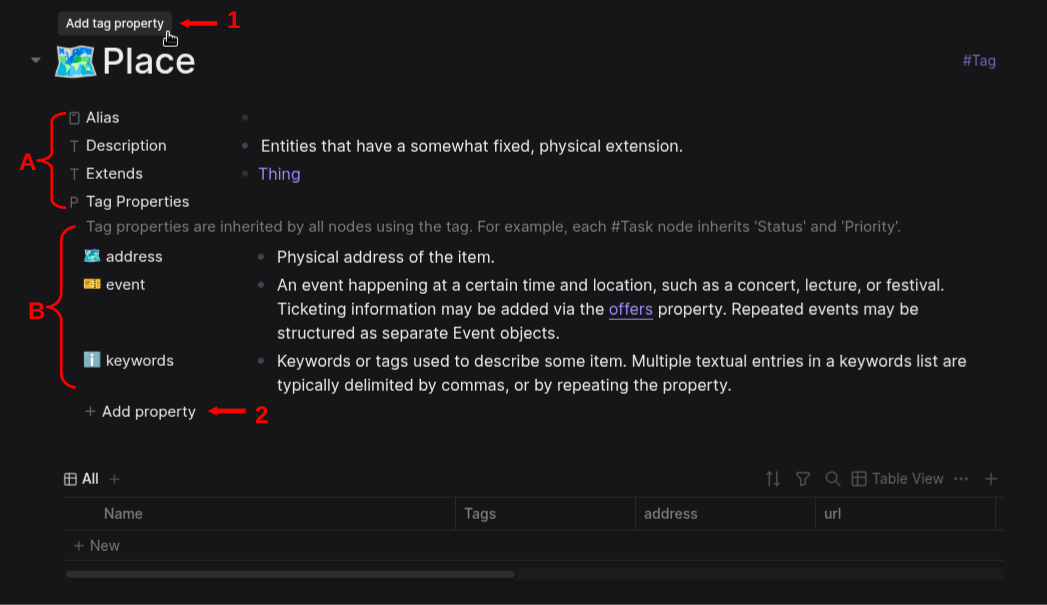
I have some questions about the new Tag Properties in the db version. I know that tag properties can be inherited by other children tags, but I am confused about the separation in two groups, see in the screenshot below the two curly brackets. I can understand that the properties in curly bracket B are the ones being inherited, but what about those in the curly bracket A? What is their purpose/usage?
And a second question is about the UI. Since the properties that are on the lower part, the ones in the curly bracket B, already have a UI button to add a new Tag property: + Add property(the one marked with the arrow No2 in the screenshot), shouldn’t the UI button that appears when hovering the cursor over the name of the Tag, Place in the example of the screenshot, the one that is marked with the arrow No1 Add tag property add new properties in the group of curly bracket A? Currently when clicking on the Add tag property (arrow No1) it adds the new tag on the lower group in curly bracket B. I have found no UI button to add new properties in the upper group of curly bracket A.
You may have figured this out already, but since no one has responded I thought I would chime in.
I don’t know if there is a specific way they are meant to be used, but as you already mentioned in your post, they provide a way to assign metadata to tags themselves (which are ultimately nodes anyway). It all kind of depends on how you use tags.
It looks like you are using this template, which you mentioned in Confused about tags inside property values in db version. I don’t know how that template designer leverages tag properties, but there are lots of possibilities. It is also worth noting that even properties can be given metadata/properties of their own. One way I am using this feature is to designate properties that are the inverse of a given property (which is used as a typed link, such as “cites/cited by” etc.). This makes it easy to display the right link label for a relationship depending on which node is the subject or object (without having to manually input the link both ways each time). Of course, to make this useful it is necessary to write an advanced query (which I have not really done yet  )
)
Hey, giraffes, thanks for taking the time to answer my question.
But I am still confused about how Logseq db sees this separation. It seems that I must wait for the release of the db version so people start making tutorials and show how this is used. Thank you again for answering my question.