It would be great if there was a way to search only for pages. I know there is a way to search for nodes, but to filter that even further down to pages would be great.
1 Like
One option I have found for this is to put [[ before the text. This seems to limit it to pages but I don’t see this in the official documentation
1 Like
If you use the default Cmd + K (or Ctrl + K) search modal in Logseq, typingright into the input searches both Page titles and individual Blocks, which gets noisy fast on a large graph.
Two built-in ways to search only Pages:
- Shortcut
Cmd + O(orCtrl + Oon Windows/Linux):
WhileCmd + Kis the global full-text (blocks + pages) search, pressingg p(Go to Page) or filtering inside the command palette prioritizes page names. - For an exact Page-only query inside any page or journal:
If you want a live list of pages matching a keyword or property without block results mixed in, use a simple Datalog/Advanced Query looking at:block/name(which only exists on Page entities, not regular blocks):#+BEGIN_QUERY {:title "Pages matching keyword" :query [:find (pull ?p [*]) :where [?p :block/name ?name] [(clojure.string/includes? ?name "your-keyword")]]} #+END_QUERY
1 Like
Thanks for the reply!
Shortcut Cmd + O (or Ctrl + O on Windows/Linux):
While Cmd + K is the global full-text (blocks + pages) search, pressing g p (Go to Page) or filtering inside the command palette prioritizes page names.
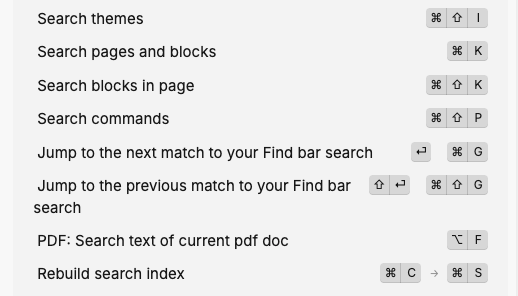
I am on mac, db version, and this does not seem to do anything? I also don’t see it documented. See image below
1 Like