I’m new to Logseq and LOVE it and I hope there is a way to do the following:
I’m a professor and would like to share with two students a PDF and it’s associated page with annotations and notes. When I used a plug-in to download it, it only downloads the annotations, not the article. As far as I know, the students don’t have Logseq although I wouldn’t have a problem asking them to sign up so they can see the annotations and my specific notes for them.
Any way to do this? (I’ve done this in Roam and other programs so I hope I can do it here!)
Thanks!
Hi,
if you are asking, whether there is an intended, user friendly way: probably not (yet).
But I think there is a way, not even that hard:
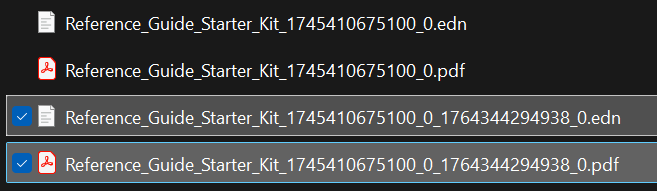
When you drop/paste a pdf into a page, logseq creates a copy of the file with a modified name. This new file is in logseq’s “assets” subfolder (to get there you can right-click on the title of any page, “open in directory” (now you see the files of your pages), go into the parent dir and then into the “assets” dir). Now when you mark/annotate something in/on your pdf logseq will create a second file with the exact same name except with .edn as extension.
Now to share the annotated pdf you have send both these files. When you students get them they have to drop them into their assets directory. Then they have to copy the name of the pdf (incl the numbers appended by your logseq) and make/modify a link in their desired place in their logseq to point to it.
note: if they drag&drop your pdf into their logseq page directly it will be treated as a new document, the name will get new numbers appended and your notes will not be linked. the files need to be pased directly into the directory
I am a beginner at Logseq and am exploring this for note-taking as I have just started my financial engineering course. I don’t have much Tech background except that I work with SQL and Python hence need help with the basics. I have downloaded wiki-search plugin (search wikipedia), but I am unable to use it. I tried /wiki command in the search bar but nothing shows up. All my feature and developer mode settings are enabled, but there no plugin icon as well showing on top. Is there any thing that I am missing? Or should I ask this in a different topic?