Unordered and ordered lists: How to use them best?

After experimenting with LogSeq for quite some time, I would now like to use it more frequently and regularly. When using unordered and ordered lists, I am unsure how they should be used.

If I understand the documentation correctly, there are two options:

  • Use a separate block for each entry
  • Use the Markdown approach with a block of entries

To illustrate what I mean, here is an example of a separate block for each entry

- Unsorted list
	- Entry 1
    - Entry 2
    - Entry 3
- 
- Sorted list
    - 1. Entry 1
    - 2. Entry 2
	- 3. Entry 3

And here is an example of the Markdown approach with a block of entries

- Unsorted list
  * Entry 1
  * Entry 2
  * Entry 3
- 
- Sorted list 
  1. Entry 1
  2. Entry 2
  3. Entry 3

The advantages of the first option are:

  • Multiple levels are possible.
  • It corresponds to the typical structure of LogSeq.
  • It is easier to write.

The disadvantages are:

  • It is not always clear, especially with multiple levels, where the list begins and where it ends.

The advantages of the second option are:

  • The relationship between the individual entries and the list itself is clear.

Disadvantages:

  • Only one outline level is possible
  • More time-consuming to write

My questions, which I have not yet been able to answer:

  • Which option should I prefer?
  • Which option do you use and why?
  • Does one or the other variant have advantages in terms of
    • using the md or DB version
    • printing
    • exporting to html and pdf format

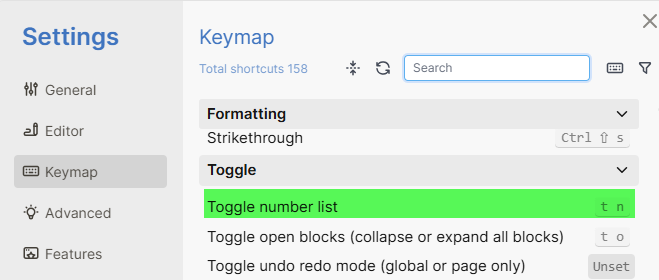
I am not sure if this relevant or answering your question but I use shortcut t n to switch between ordered and unordered list view.

block of entries for:

  • properties;
  • checklists * [ ]...;
  • all that is strictly linked to the first line of the block (e.g. description).

Note: in markdown files numbered lists does not exist.

This is where I found the shortcuts

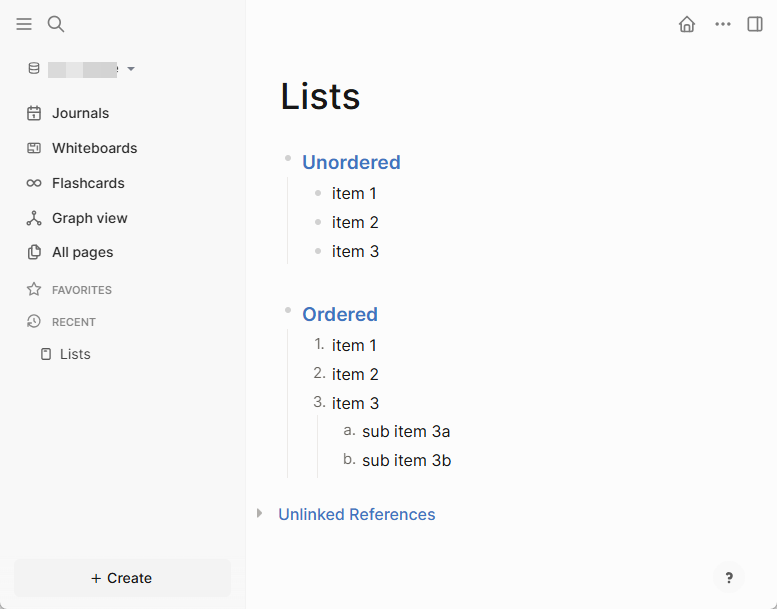
And here is an example.

I didn’t know about the shortcut t n for switching between the sorted and unsorted list view. Very nice. It saves a lot of time compared to changing it manually.

You mean that because of the indentation, the entries in the ordered and unordered lists are strictly linked to the parent entry and therefore do not need to be marked as a list?

My problem is how to distinguish between a list (ordered or unordered) and “normal” blocks. According to the above description, both are parent elements with one or more indented child elements.

What you mean by “list” is a list… :wink:

I see a block of entries as a list that serves the block title. Within such a block there are no parent-child relationships. It behaves as a single unified structure (just look at how the “select all” command treats it).

In contrast, separate blocks do have parent-child relationships and a certain degree of autonomy relative to their parent node. You can zoom into a child block, but not into a block of entries.