What’s New with Logseq - May 16th 2026
A snapshot of what landed in Logseq between April 27 and May 16, written for people who want to know what’s in it for them — not a commit list.
Big news from Logseq HQ
A few announcements worth catching up on before the feature rundown:
-
Logseq is splitting into two versions. A significant direction-setting update on where the product is heading and what it means for current users. Full announcement here: https://logseq.io/p/e3YDyX5AYr
-
The Logseq roadmap is now live and public — and it’s hosted in Logseq itself, so you can browse what’s planned, what’s in flight, and what’s done in the same kind of graph you use every day: https://logseq.io/p/NX4mc_ggEV
-
Sync testing is open to Open Collective Sponsors.
Backers will soon get an invite to try the new Sync. A good moment to subscribe if you’ve been on the fence and want early access.
1. Markdown Mirror: your DB graph, also on disk
Logseq’s DB graphs live in SQLite. That’s great for queries and structure, but it makes it harder to use the rest of your tooling — backups, grep, version control, other markdown editors — against your notes.
Markdown Mirror changes that. When you enable it on a graph, Logseq writes a plain markdown projection of your blocks to a folder on disk and keeps it in sync as you edit. Each block gets a stable id embedded in a comment so the mirror survives renames and moves without losing its anchor. Path collisions are resolved automatically, and renaming a page cleans up its old mirror file.
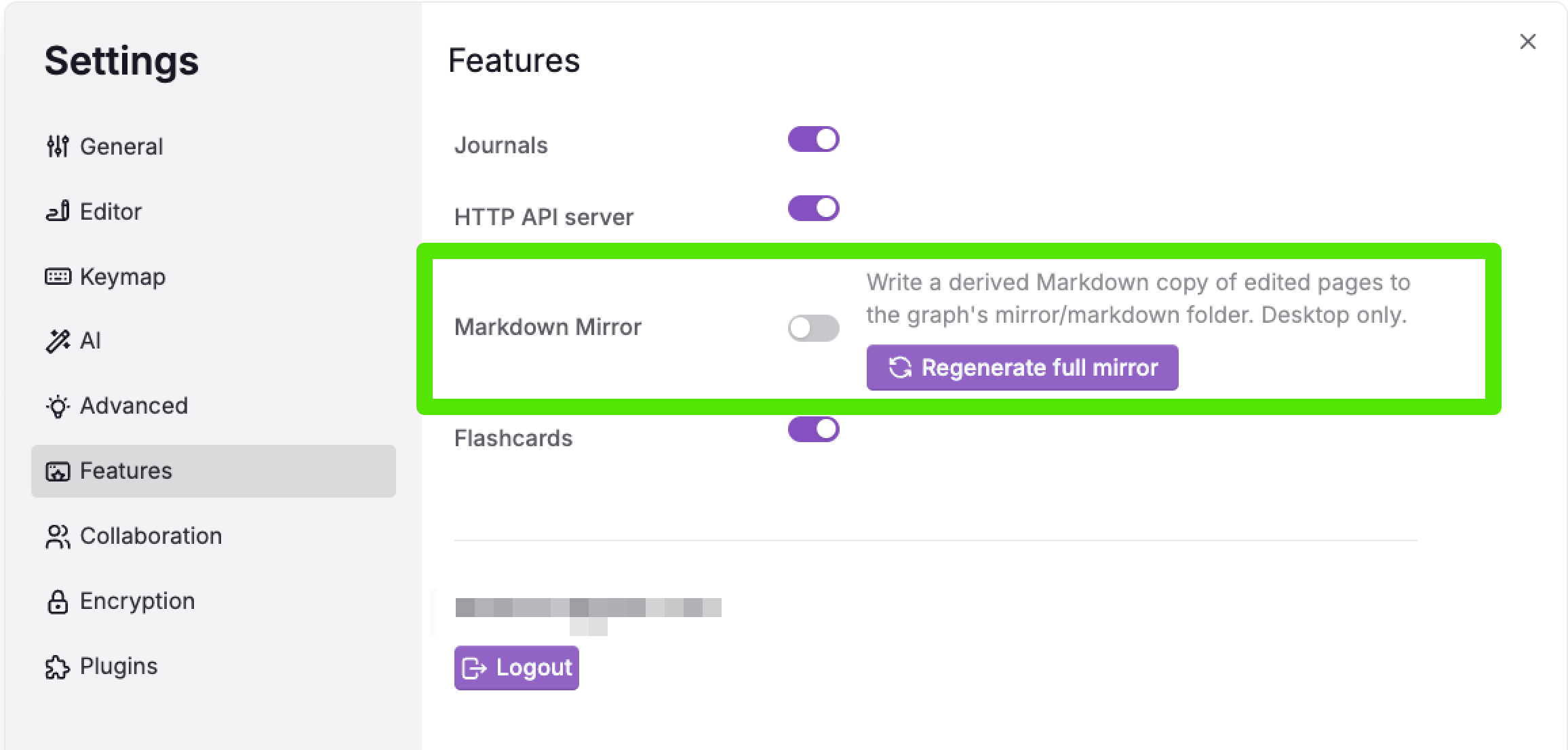
What’s in it for you
-
Run
grep,ripgrep, or any markdown tool over your Logseq content. -
Back up or version-control your graph with
gitlike any other markdown folder. -
Open the mirror in another editor when you want a different view of the same notes.
It’s opt-in per graph, so you can turn it on for a single project without affecting the rest of your graphs. The two-way version — where edits in the markdown file flow back into the DB — is in active development on a feature branch and not yet shipped.
2. The Logseq CLI is now a real thing
The CLI has matured into a full-featured tool for driving Logseq from a terminal. The biggest additions this release:
-
qmd querylets you run multi-part Logseq queries from the command line. Pipe results into scripts, build dashboards, or feed agents — without opening the desktop app. -
sync asset downloadpulls missing assets straight from sync. Useful for headless setups and CI. -
graph create --enable-syncwires up sync at graph creation time so you don’t have to enable it later. -
Unified backup path — the CLI and the desktop app now share one backup implementation, so scripted backups behave the same as the in-app ones.
-
Bundled into desktop releases so the CLI ships with the app on every platform.
A handful of paper cuts also got smoothed over: better error messages when no e2ee password is set, three-line table output on list commands, longer timeouts for big uploads, and a warning when an installed skill is out of date. The latest fixes round this off with a clearer sync upload --help, a trimmed “invalid query” message, hiding empty property ids in show, and rejecting :db/id datom clauses with a clear error instead of a cryptic stacktrace.
What’s in it for you
-
Automate routine graph work (exports, batch updates, queries) from your existing scripts.
-
Drive Logseq from agents, cron jobs, or CI without needing the GUI running.
-
Inspect or back up graphs over SSH on a headless box.
3. Graph View V2
The graph view has been rebuilt from scratch. The old one was sluggish on big graphs and awkward to navigate. The new one renders faster, scales better, and is easier to move around in.
A few follow-ups landed right after the rewrite: a task zoom-in view so you can focus on a single task’s neighborhood, a pass on interaction polish, and deduped node and property choices in the node picker so the same option doesn’t show up twice.
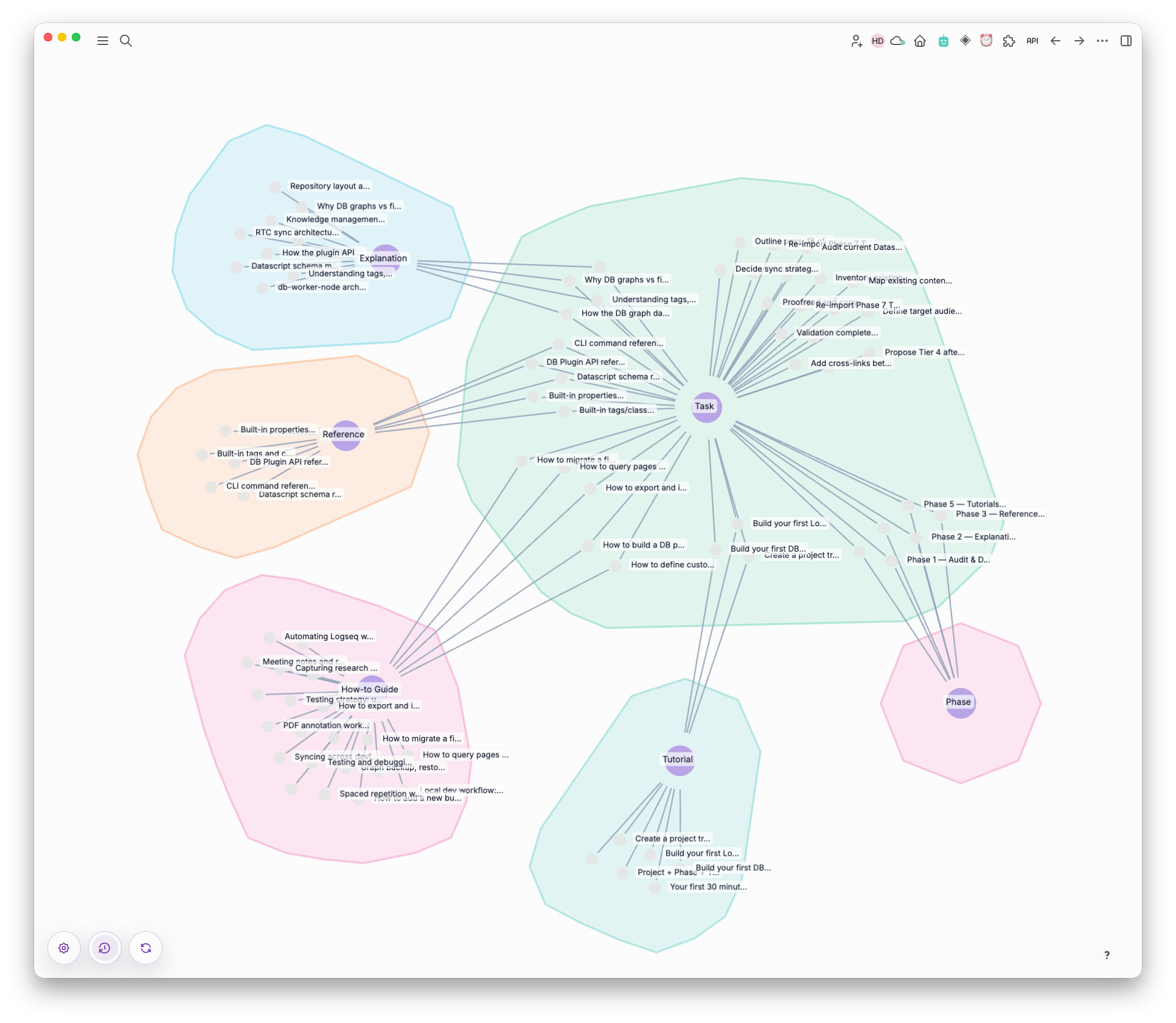
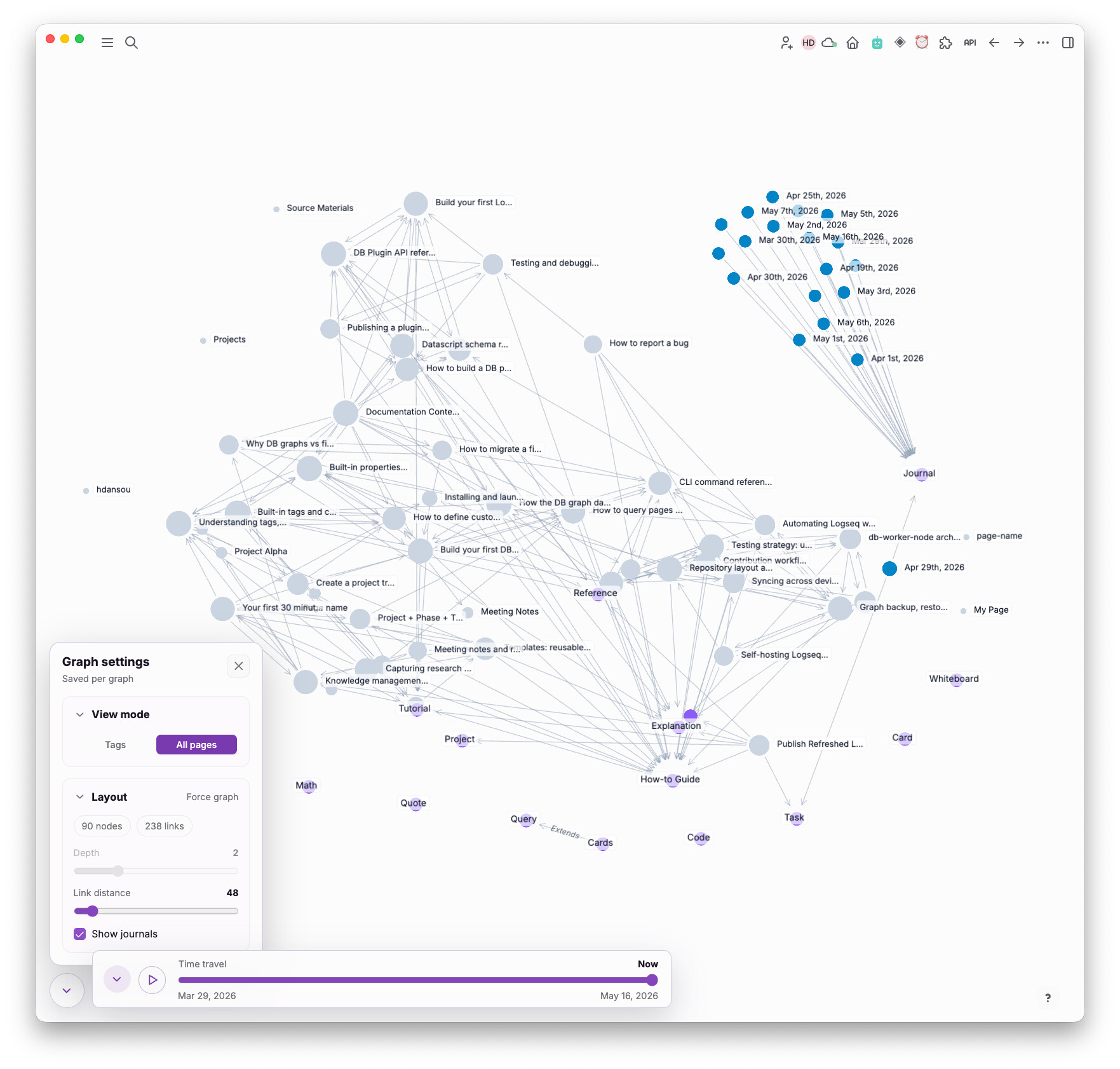
What’s in it for you
-
Open the graph view on a 10k+ block graph without watching it stall.
-
Find clusters and orphan pages more easily.
-
Zoom into a single task to see what it’s connected to without losing the rest of your graph.
4. Sync gets sturdier
This release puts a lot of work into the edges of sync — the situations where it used to fail quietly.
-
RSA key cache scoped per server — switching between sync servers no longer reuses the wrong key.
-
Snapshot payload cap — a single oversized payload (e.g. a giant Excalidraw scene) can’t stall the upload queue anymore.
-
Websocket recovery — stale sessions restart cleanly; in-flight uploads clear on reconnect; downloads resume from the right path after interruption.
-
Title conflicts — if two devices rename the same page, the latest write now wins consistently.
-
Encrypted graphs — wrong password on download surfaces a real error instead of silent failure; deleted properties stop replaying back onto the server.
-
Mobile sync — Android graph downloads that were broken now work; remote graph creation initializes its transaction state correctly.
-
Stale large-title objects are now dropped, so abandoned uploads of giant titles don’t accumulate in the sync state.
What’s in it for you
-
Fewer mystery sync errors, especially on big graphs and flaky networks.
-
Encrypted-sync setups behave more predictably across reboots and password changes.
-
Multi-device editing is less likely to drift.
5. Publishing keeps your protected pages protected
The Publish backend got several privacy fixes:
-
Hidden properties no longer leak into the published page render.
-
Protected pages stay out of references, user listings, and tag listings.
-
The public
/pageslisting endpoint has been removed. -
Legacy short and
/page/URLs still resolve so old links don’t break.
There’s also a new configurable Publish server URL, so self-hosted setups can point Logseq at their own publish backend.
What’s in it for you
-
Publish your graph without worrying that “protected” pages will show up where they shouldn’t.
-
Host your published graphs on your own infrastructure if you don’t want to use Logseq’s.
6. Plugin power-ups
Notable plugin-system additions:
-
Custom block renderer — plugins can now render their own block UI inside the editor, not just the right sidebar. Opens up much richer integrations.
-
Plain JS objects over Electron IPC — plugins no longer need to manually serialize data when crossing the IPC boundary.
-
Uninstall unused plugins — a new flow in the plugin manager surfaces plugins you haven’t used and lets you remove them in one click.
-
libsimprovements — the storage and API surface got smaller, more consistent, and easier to depend on. Legacy storage APIs have been kept working alongside the cleaned-up surface. -
Marketplace search now matches descriptions — once you type 3+ characters, plugins also match on their description text, not just the title. Easier to find that “the one that does X.”
-
Plugin thumbnails — plugin manager cards can show their own thumbnail icons so installed plugins are easier to scan visually.
What’s in it for you
-
Plugin authors can build features that would have been awkward or impossible before.
-
Less plugin cruft accumulating in your install over time.
7. A new :asset property type
Properties got a first-class “Asset” type this week. Pick :asset for a property and the picker opens a 4-column thumbnail grid of every image, PDF, or asset block in the graph — no more pasting paths or searching by name.
Once the value is set, the property cell renders the asset inline with two action buttons:
-
View opens images in the lightbox and PDFs in the in-app viewer (same path as the inline PDF handler).
-
Swap reopens the thumbnail grid so you can replace the value in one click.
A few related reliability fixes also landed alongside it: partial property value writes are prevented, block property value deletion works cleanly, the property config regression is fixed, and scoped node property values are noticeably faster in dense graphs.
What’s in it for you
-
A natural “this card has a cover image” or “this task has an attachment” property without leaving the editor.
-
Browse and pick assets visually instead of searching by filename.
8. Editor polish that adds up
A long tail of small fixes that you’ll notice if you hit them:
-
Fullwidth
[IME auto-completion for CJK users — typing a fullwidth left bracket inside an IME no longer drops input. -
Flashcards — the dialog no longer closes immediately after finishing one card, and collapsed children load when you reveal an answer.
-
Breadcrumbs are easier to scan at deep nesting levels.
-
Markdown formatting — quotes, code blocks, and headings render more consistently.
-
Paste in the outliner — pasted property value UUIDs are remapped so duplicates don’t fight; general paste regressions are gone.
-
Math — mhchem reaction arrows render correctly. Plus a new
$autopair for inline math: type$and you get the closing dollar for free (with sensible double-$$handling for block math). -
Indent/outdent in focused view — blocks can no longer be outdented past the zoom root.
-
Calculator — the CodeMirror inside the calc now expands without showing scrollbars.
-
Headings — heading bullets, heading icons, and the dark right-sidebar header are now properly aligned. Markdown headings inside quote blocks render correctly.
-
Block selection while scrolling — selecting a long range no longer breaks when you scroll mid-drag.
-
Sidebar asset drops — dragging an image into the right sidebar now actually drops it where you intended.
-
Cmdk shortcut — the command-k sidebar shortcut no longer leaks out to global handlers when you’re inside the panel.
-
Code-block conversion — converting a block to a code block no longer carries the old title state with it.
-
Flashcards — the FSRS cloze macro now renders cleanly with superscript and subscript markup.
-
Firefox paste — pasting in Firefox now lands content where you’d expect instead of being silently dropped or mangled.
-
Breadcrumb labels — block refs in breadcrumbs now resolve to their title text instead of showing a raw UUID, and the breadcrumb icon layout no longer drifts on long paths.
-
Resized images — a resized network image keeps its width when you reopen the page.
-
Code blocks — the code block language is preserved when round-tripping a block.
-
Spaces between refs — refs sitting next to each other in a heading no longer collapse the space between them.
-
PDF viewer toolbar — the toolbar background color is correct again instead of blending into surrounding chrome.
-
Left sidebar favorites — long favorite names truncate cleanly instead of overlapping the ellipsis menu.
-
Breadcrumb icon layout — icons no longer get squeezed out on long breadcrumb paths.
-
Missing journal links — opening a journal page from the keyboard shortcut now creates the page if it doesn’t exist.
-
Localized notifications — i18n keys are passed through in notification payloads so translated notifications show the right localized strings.
Plus iOS TestFlight is back to working fonts, and the app has finished migrating to Capacitor 8 on mobile.
9. Tag system cleanup and the ((block-ref)) deprecation
Two related changes for how Logseq handles references and tags:
-
Tag aliases no longer pollute tag completion — alias labels stay out of the autocomplete list.
-
The “convert to tag alias” action is hidden where it doesn’t make sense.
-
Markdown tag link aliases survive an edit/save cycle.
-
Block refs survive hashtag link merges — a block ref inside a hashtag link is no longer dropped when refs are merged.
-
Class hierarchy is hidden where it isn’t useful, and class label maps resolve correctly.
-
The legacy
((block-ref))syntax is being deprecated. Block refs in titles are converted to page-refs on import, and the i18n key for the deprecated syntax has been removed. For new content, reach for page-refs ([[Page Name]]) and the new:asset/ node-typed properties. Existing block refs in block bodies still work — this is about the title/import path and what you should write going forward.
10. Recurring tasks now match their cookie
Logseq’s docs have always defined three repeater cookies for recurring tasks (.+, ++, +), each with different semantics. The scheduler was ignoring the cookie and applying a single ++-like behavior for every recurring task. That’s now fixed — .+1w repeats from the last completion date, ++1w advances from the scheduled date by whole intervals, and +1w advances by a single interval.
There’s also a fix for reproducible task choices, so generated repeats stay stable.
What’s in it for you
- If you’ve been writing
.+cookies and getting++behavior, your tasks will finally reschedule the way the docs say they should.
11. New small features worth knowing about
A handful of self-contained additions that don’t need their own section:
-
AVIF and CR2 image support — drop a RAW photo or AVIF asset into a block and it renders inline like any other image.
-
“Always on Top” window option — keep the Logseq window pinned above your other apps from the Window menu. Useful when taking notes while watching something or referencing another doc.
-
QuickCapture
prettify-url?— a new option that auto-formats captured URLs (turns them into clean titles instead of raw links). -
Windows file URL fix — opening file URLs from block links now works correctly on Windows.
-
Published page RTL/LTR — pages with mixed right-to-left and left-to-right content lay out correctly thanks to a
dir="auto"fix. -
Published task bullets — task markers and bullets no longer overlap on mobile published pages.
-
New
logseq-answer-machineagent skill — adds a question-answering workflow against a graph for agent setups. -
Search no longer chokes on quotes — SQLite FTS quote parsing and more cases of invalid FTS input are handled, so search queries with quotes or unusual punctuation don’t fail anymore.
-
External and local asset URLs are handled more consistently, including external-url paths and plugin binary writes.
12. Imports got more faithful
If you’re bringing graphs in from elsewhere, this batch of fixes preserves more of what was there:
-
Task statuses survive the import instead of resetting to default.
-
Repeated schedules carry over with their repeat info intact.
-
Namespaced inline tags (e.g.
#project/work) import as namespaces, not flat tags. -
Auto heading pre-blocks import correctly.
-
Mixed quote blocks survive DB export.
-
SQLite DB exports now write as proper binary — both the original fix and a follow-up that handles the desktop binary export path, so exported
.sqlitefiles open cleanly in standard SQLite tools. -
Web client-ops DB export is unblocked.
Plus a couple of fixes for repairing older graphs: the wrong datoms format produced when fixing invalid data has been corrected, and graphs with leftover invalid data from older versions no longer crash on load.
13. What’s coming next
Three pieces of in-flight work worth flagging — visible on feature branches, not yet shipped:
-
Two-way Markdown Mirror — the read-only mirror from section 1 is on its way to becoming a true round-trip. Edits to the on-disk markdown will sync back into the DB graph, with ADR 0017 spelling out the model, mirror-id sparsification, mirror-property syntax, and a Logseq Sync compatibility test suite to keep the two sides honest. This unlocks editing your graph from any markdown editor with confidence.
-
Vite migration — the build pipeline is moving off gulp + shadow-cljs onto Vite. UI and plugin SDK builds are already on Vite on the branch, electron scripts run via node, and shadow externals namespace imports have been rewritten for the Vite resolver. The payoff: noticeably faster local dev cycles and a more standard JS toolchain for contributors.
-
Property UX refinements — a focused pass on the property editor: the route-root hidden toggle becomes visible, the date edit icon is gated to the right contexts, and the bottom property edit popup tightens up. Smaller but high-frequency wins for anyone living in properties day-to-day.
TL;DR — what should you actually try?
-
Turn on Markdown Mirror for one graph and point your favorite markdown tools at it.
-
Try the new CLI — install it from your desktop build and run
logseq qmd queryagainst a graph. -
Try the new
:assetproperty type on a page with attached images or PDFs. -
If you use recurring tasks with
.+cookies — try one and confirm it now schedules from the completion date. -
Open the graph view if you stopped using it because it was slow, and try the new task zoom-in.
-
If you publish — re-check your protected pages; they’re now properly hidden.
-
Drop a CR2 or AVIF image into a block to confirm your library renders inline.
-
Type
$x^2$in a block to feel the new inline-math autopair. -
Enable “Always on Top” in the Window menu when you next take notes alongside another app.
For the full categorized changelog (every PR, fix, and commit reference), see the Logseq DB changelog thread on the forum.
Questions or issues? File them at https://github.com/logseq/db-test/issues.