Nayar
December 30, 2024, 5:42am
1
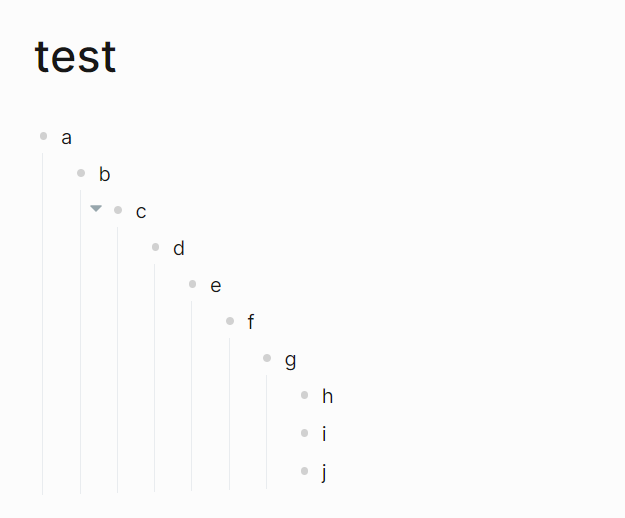
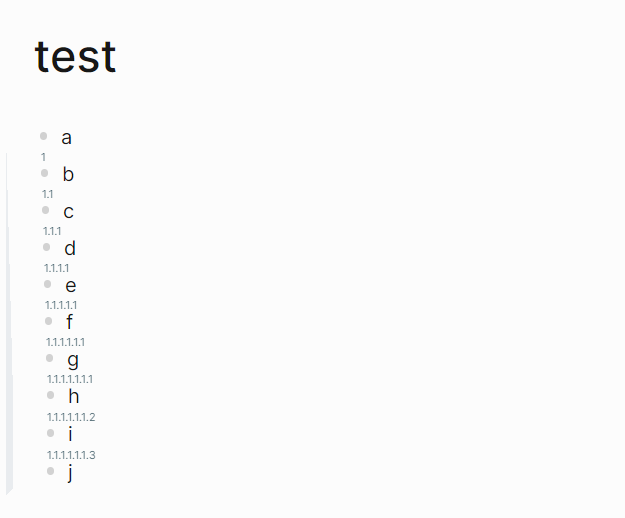
When block has many levels, the content space becomes very small. To solve this problem, I implemented another hierarchical representation using CSS, which takes up almost no content space.
normal lists
nested number lists
To achieve this effect, simply copy the following code into custom.css
/* no indentation */
.block-children-container { margin-left: 0px !important; padding-left: 0px !important;}
.block-children { margin-left: 0px !important; padding-left: 0px !important;}
/* nested number lists */
.block-children { counter-reset: l-num; }
.block-children .bullet::after {
  counter-increment: l-num;
  content: counters(l-num, ".");
  position: absolute;
  top: -6px;
  font-size: 9px;
}
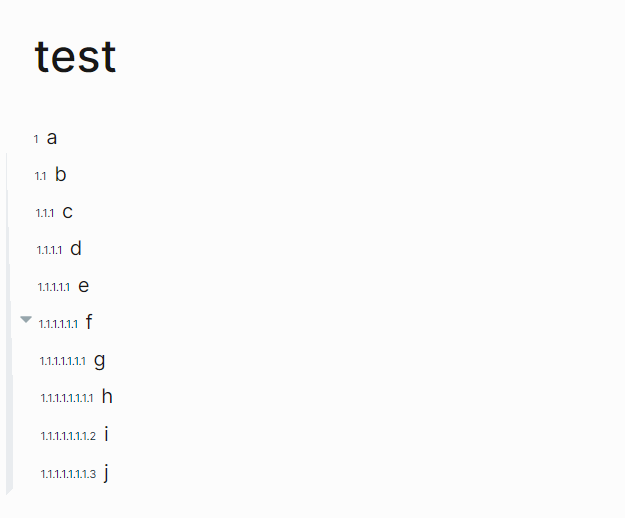
Good work, that will be so useful. But i want if i can replace the bullets with that nested numbers like cannibalox did it in this tuto .
Nayar
January 3, 2025, 5:43am
3
Of course, this effect can be achieved.
Just use the CSS below, hope it help you
/* no indentation */
.block-children-container { margin-left: 0px !important; padding-left: 0px !important;}
.block-children { margin-left: 0px !important; padding-left: 0px !important;}
/* no bullet */
.bullet-container { display: none !important; }
.bullet { display: none !important; }
/* nested number list */
/* /level-1 */
.page-blocks-inner {  counter-reset: l-num-level-1; }
.ls-block[level="1"]>.block-main-container>.block-control-wrap>.bullet-link-wrap::after {
  	counter-increment: l-num-level-1;
 	content: counters(l-num-level-1, ".");
  	font-size: 9px;
  	display: inline-block;
  	width: max-content;
}
/* /children */
.block-children { counter-reset: l-num; }
.block-children .bullet-link-wrap::after {
  	counter-increment: l-num;
  	content: counters(l-num-level-1, ".") "." counters(l-num, ".");
  	font-size: 9px;
  	display: inline-block;
  	width: max-content;
}
3 Likes
One more last thing, how to have the last block have no numbers on it.
Nayar
January 3, 2025, 11:42pm
6
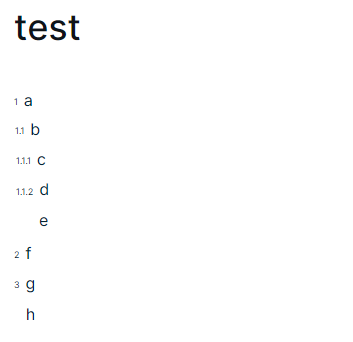
I’m glad you like it. There is a way that last block of every level has no numbers, I’m not sure if it’s the effect you want.
If yes, add the following CSS below the previous CSS
.page-blocks-inner .ls-block:not(:has(.ls-block)):last-child .bullet-link-wrap::after {visibility: hidden;}
1 Like
Thank you so much for this
amazing feature! thanks for sharing it!
Is there a possibility to apply this style selectively on a block (and all its child blocks)?
Nayar
May 7, 2026, 12:55pm
11
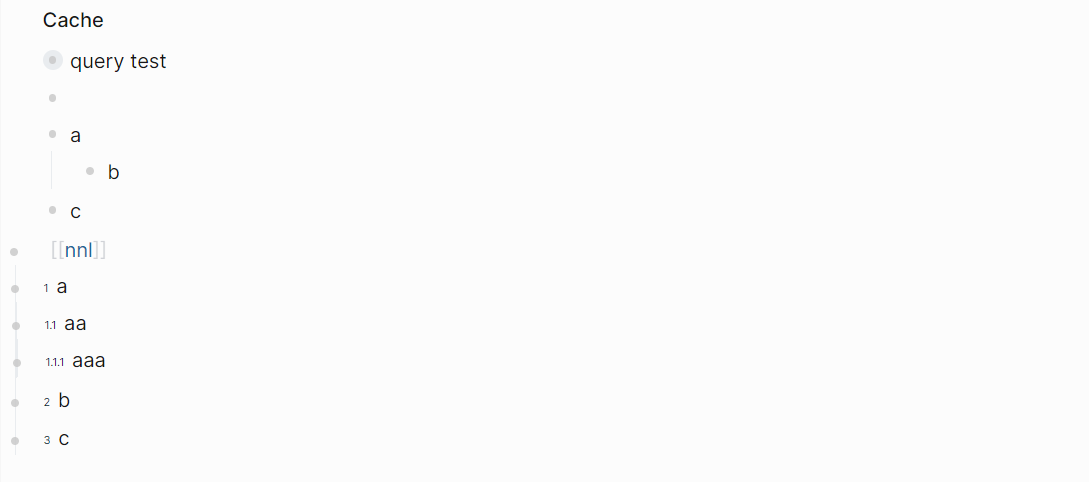
I’m glad you like this feature.#nnl tag in the block.
/* no indentation */
[data-refs-self*="nnl"] .block-children-container { margin-left: 0px !important; padding-left: 0px !important;}
[data-refs-self*="nnl"] .block-children { margin-left: 0px !important; padding-left: 0px !important;}
/* no bullet space */
[data-refs-self*="nnl"] .block-children-left-border { display: none !important; }
[data-refs-self*="nnl"] .bullet-container {
  position:absolute !important;
  left:-9px;
  top:9px;
}
/* nested number list */
/* /children */
[data-refs-self*="nnl"] .block-children { counter-reset: l-num; }
[data-refs-self*="nnl"] .block-children .bullet-link-wrap::after {
  counter-increment: l-num;
  content: counters(l-num, ".");
  font-size: 9px;
  display: inline-block;
  width: max-content;
}
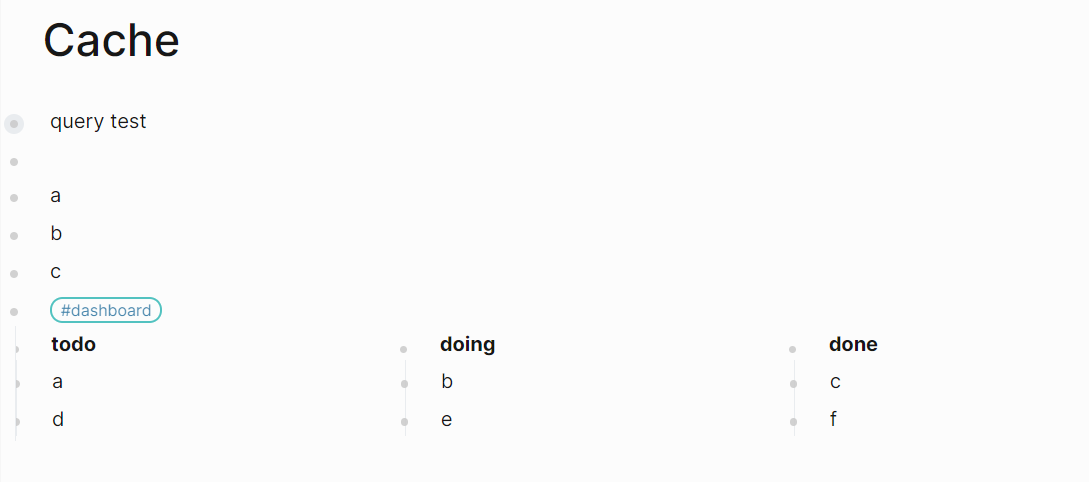
Similarly, the following CSS can be used to implement a dashboard.
div[data-refs-self*="dashboard"]>.block-children-container.flex {
    width: 100%;
}

div[data-refs-self*="dashboard"]>.block-children-container.flex>.block-children.w-full {
    display: inline-flex;
    position: relative;
    overflow-x: auto !important;
    overflow-y: hidden;
    margin: 0 10px;
}

div[data-refs-self*="dashboard"]>.block-children-container.flex>.block-children.w-full>div.ls-block {
    display: inline-block;
    padding: 0;
    width: inherit;
    min-width: 100px;
    margin-right: 10px;
}